Anker vs Jackery Power Stations: Which Is Better? (October 2026)
For Anker vs Jackery, choose the C300 DC for a USB-based kit, the Explorer 300 for small devices with wall plugs, or the Explorer 1000 v2 for larger AC loads.
On this page (10 sections)
- Anker vs Jackery: which model fits your devices?
- How much battery capacity do you need?
- Which ports matter for your setup?
- Who should buy or skip each model?
- How easy are they to carry and pack?
- Which charging setup should you plan around?
- Can you rely on solar charging while camping?
- How should you set up and care for the station?
- What common buying mistakes should you avoid?
- Anker vs Jackery: make the final choice
For Anker vs Jackery, choose the Anker SOLIX C300 DC for USB-powered gear, the Jackery Explorer 300 for small devices with wall plugs, or the Explorer 1000 v2 for larger AC loads.
The closest comparison is between the 2 compact stations. Their batteries hold nearly the same energy, but their connections serve different kits.
The larger Jackery belongs in a separate decision: do you need more appliance power, longer runtime, or both? These 3 models offer different answers, so choose the station before choosing the brand.

Anker vs Jackery: which model fits your devices?
Choose by plug type first, power demand second, and runtime third. This order rules out unsuitable stations before you pay for capacity you can't use.
Start with the devices you actually plan to pack or keep running during an outage. A phone-and-laptop kit needs a different station from a refrigerator backup plan.
| Model | Battery capacity | Output | Main reason to choose it |
|---|---|---|---|
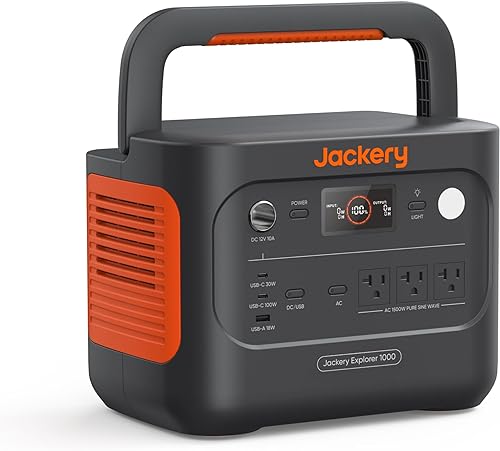
| Jackery Explorer 1000 v2 | 1,070Wh | 1,500W AC, 3,000W surge peak | Larger AC loads or longer use |
| Jackery Explorer 300 | 292Wh | 300W rated, 600W peak surge | Compact power with AC outlets |
| Anker SOLIX C300 DC | 288Wh | 300W across supported DC connections | USB and car-socket devices |
The compact models differ by only 4Wh. That small gap shouldn't decide your purchase when one model has wall outlets and the other doesn't.
A higher score doesn't make the larger Jackery the right choice for every buyer. For a bag of USB gear, its extra capacity may add more carrying weight than practical benefit.
Anker vs Jackery for a mixed device kit
Pick the Explorer 300 for a mix of USB devices and low-draw wall-plug equipment. Pick the C300 DC when every essential device accepts a suitable USB or car-socket connection.
Check the input label on each device or its charger. A familiar connector doesn't prove that the voltage, charging protocol or available power will match.
For a broader explanation of these choices, use the complete portable power station buying guide.
How much battery capacity do you need?
Size the battery around watt-hours used between recharge opportunities. Watts describe power demand at a moment; watt-hours describe stored energy.
For a steady load, multiply watts by hours. A 40W setup used for 5 hours needs 200Wh at the devices, before allowing for conversion losses and the station's own consumption.
That makes a roughly 300Wh station a sensible starting point for that example, but it leaves less room for extra devices or a delayed recharge. Build in a reserve when losing power would disrupt your plans.
The Explorer 1000 v2 holds about 3.7 times the energy of the Explorer 300. Its larger reserve matters most when your devices run for hours or charging opportunities are far apart.
Don't estimate a refrigerator's daily energy use by assuming its compressor runs constantly. Cycling, room temperature and door openings affect consumption, while startup demand creates a separate output requirement.
Our guide to running a refrigerator from a portable power station explains how to check both needs.
Which ports matter for your setup?
Choose enough suitable connections for the devices you'll use together. Counting ports alone misses per-port limits and the station's total output ceiling.
The Explorer 1000 v2 has 3 pure sine wave AC outlets, 2 USB-C ports, 1 USB-A port and a car port. It supports 100W USB-C charging for compatible devices.
The Explorer 300 offers 2 AC outlets, a 100W USB-C PD port, 2 USB-A ports and a 120W car port. That mix suits a laptop alongside low-draw equipment that needs its own wall adapter.
The C300 DC provides 2 two-way 140W USB-C ports, 1 100W USB-C port, 1 15W USB-C port, 2 12W USB-A ports and a 120W car socket. It has no AC outlets.
Individual port maximums aren't a promise that all ports can reach those figures together. Add your simultaneous loads and check how power is shared before planning a multi-device setup.
When can you leave wall adapters behind?
Use direct USB-C charging when both the device and cable support the required power. This reduces the adapters you carry and avoids converting battery power to AC and back through a charger.
A cable suitable for a phone may limit a higher-power laptop connection. Match the cable to the charging rate you need, and reserve the higher-output ports for devices that can use them.
Keep an AC option if an essential device has no supported USB or DC charging method. A passive adapter changes a connector's shape, not the type of electricity available.
Who should buy or skip each model?
Buy the smallest station that meets your essential loads with a useful reserve. Each model has a clear role, and each has buyers who should choose something else.
Jackery Explorer 1000 v2: for appliance backup and longer stays
Choose the Explorer 1000 v2 for a vehicle-based trip or home backup plan that exceeds the compact models' energy or AC limits. Its higher output gives you room for larger loads, provided their running and startup demands fit.
Skip it if your routine is charging a phone and laptop between nearby outlets. Carrying a larger battery makes little sense when you rarely use the extra energy.
Don't assume any refrigerator, air conditioner or cooking appliance will work simply because it plugs in. Check the exact appliance, and count other devices you'll run at the same time.
Jackery Explorer 300: for small gear with standard plugs
Choose the Explorer 300 when you need compact AC access for travel, a short camping stay or a small outage kit. It lets you keep using suitable wall adapters alongside USB devices.
Skip it for high-draw cooking, heating or a demanding appliance backup plan. A brief surge allowance doesn't let a station run a load above its continuous limit.
It also makes less sense when all your essential devices already accept USB-C. In that case, compare the connections you'll actually use rather than buying outlets for an unlikely future need.
Anker SOLIX C300 DC: for a USB-based travel kit
Choose the C300 DC for compatible laptops, tablets, phones and USB-powered accessories. Its range of USB connections helps when several devices need charging without separate wall adapters.
Skip it if even 1 essential item requires household AC. Buying a separate inverter adds equipment and compatibility checks that undermine a simple USB-based setup.
Our Anker SOLIX C300 DC review takes a closer look at its role as a portable charging hub.
How easy are they to carry and pack?
Choose a compact model for frequent carrying, and consider the larger Jackery when you can move it mainly by vehicle. Include cables, chargers and any solar panel in your carrying plan.
The C300 DC weighs 2.8 kg and measures 4.89 x 7.87 x 4.72 inches. Its shoulder strap is sold separately.
The Explorer 300 has an integrated handle, but published weight figures differ. Confirm the exact version's weight before ordering if you're working to a strict pack limit.
The Explorer 1000 v2 weighs 23.8 lb and has a foldable handle. Think about lifting it out of a trunk, carrying it upstairs and placing it near the equipment it will power.
Pack so you can reach controls and connections without emptying your vehicle. During use, keep ventilation paths clear rather than leaving the station buried under luggage.
Which charging setup should you plan around?
Choose a recharge method you can reliably use where you're going. A fast-charge claim helps only when you have the required charger, connections and power source.
Jackery says the Explorer 1000 v2 defaults to a 1.7-hour full charge. Its 1-hour emergency mode must be enabled in the Jackery app before each charge, so set up the app before an urgent need arises.
Anker says the C300 DC reaches 80% in an hour through dual PD 3.1 USB-C charging. That figure uses 2 charging inputs and a different target from Jackery's full-charge figure.
For the Anker's first USB-C activation, connect an 18W or higher USB-C PD wall charger to USB-C2 or USB-C3. A charging cable is included, but you'll need a suitable wall charger for that method.
Jackery gives about 3 hours for a full Explorer 300 charge through 100W USB-C and about 4 hours by car. Its package includes an AC adapter and car charger cable.
Before a trip, connect your intended charging setup and confirm the station accepts power. For source selection and charging habits, read how to charge a portable power station.
Can you rely on solar charging while camping?
Treat solar as weather-dependent replenishment, with enough stored energy to cover weak charging periods. Panel wattage describes a rated output, not an all-day supply.
The C300 DC needs an 11–28V solar panel with an XT60 connector. Anker recommends its 60W or 100W panels and excludes the PS30, other 5V/3A USB-C panels, PS200 and PS400.
Anker warns that its panels rated above 100W can cause a malfunction with this station. Don't assume a matching connector makes a panel suitable.
The Explorer 1000 v2 accepts only Jackery panels for solar charging. The Explorer 300 can also use compatible Jackery panels, and neither Jackery package here includes one.
Place the panel in unobstructed sun while keeping the station shaded and ventilated. Reposition the panel as needed, and account for energy your devices consume while the battery recharges.
Avoid planning a trip around ideal solar recharge times. Trees, clouds and short winter days can leave you with less energy than expected.
How should you set up and care for the station?
Keep the station dry, ventilated and within its manual's temperature limits. Good placement and suitable cables matter during both charging and discharge.
Before first use, read the manual, charge the station and connect your intended devices while mains power is available. Confirm that each device starts and that the combined demand stays within the station's limits.
Place it on a stable surface away from water, bedding and loose gear. Route cables where people won't trip over them or pull the station down.
For storage, follow the model's guidance on charge level and inspection intervals. Check it before storm season or a trip rather than discovering an empty battery when you need it.
The C300 DC and Explorer 1000 v2 use LiFePO4 batteries. Jackery says the larger model retains over 70% capacity after 4,000 cycles, but a cycle-life claim doesn't promise a fixed number of years.
Explorer 300 battery descriptions differ between versions, so confirm its chemistry if that determines your choice. For placement and electrical precautions, see portable power station safety.
What common buying mistakes should you avoid?
Avoid confusing battery size, output and charging speed. Each solves a different problem, and a strong number in one area doesn't fix a limit elsewhere.
- Using surge power as a running limit: Startup allowance is brief; continuous loads must fit the rated output.
- Adding outlet maximums together: Several connected devices still share the station's total power budget.
- Ignoring the recharge window: A battery large enough for one day may not suit repeated days without enough incoming energy.
- Buying an incompatible panel: Check voltage, connector and model restrictions before connecting it.
- Planning around the last percent: Leave energy for delays, higher consumption and extra charging needs.
For outage use, plug suitable devices directly into the station. Never connect its output to a household wall outlet to feed home wiring.
Anker vs Jackery: make the final choice
For Anker vs Jackery, let your hardest essential requirement decide. If that requirement is a wall plug, remove the C300 DC from your shortlist; if it's a load beyond the compact models' limits, move to a larger station.
Choose the Explorer 300 for light plug-in gear, or the C300 DC for a USB-based kit with suitable cables. Choose the Explorer 1000 v2 when your energy budget or appliance demand justifies its extra carrying weight.
Before ordering, write down your essential devices, simultaneous wattage and hours between charges. Use the power station sizing guide to turn that list into a capacity and output target.
Frequently asked questions
Is Anker or Jackery better for a small power station?
Choose Anker for a USB-focused kit or Jackery for small devices with wall plugs among these models. The C300 DC provides more USB-C connections, while the Explorer 300 includes AC outlets.
Their similar battery capacities make device compatibility more useful than a small difference in stored energy.
Does the Anker SOLIX C300 DC have AC outlets?
No, the Anker SOLIX C300 DC has USB-C ports, USB-A ports and a car socket, with no AC outlets. Choose a station with AC outlets for equipment that needs a standard wall plug.
A passive plug adapter cannot turn a USB or car connection into household AC power.
Which Jackery model has more capacity?
The Jackery Explorer 1000 v2 has 1,070Wh, compared with 292Wh for the Explorer 300. Choose the larger battery when your planned loads need more energy between charges.
Its higher output also accommodates larger loads, but the extra weight makes it less appealing for frequent carrying.
Can these power stations recharge from solar panels?
Yes, all three support compatible solar charging. The C300 DC needs an 11–28V panel with an XT60 connector, and Anker recommends its 60W or 100W panels.
The Explorer 1000 v2 requires Jackery panels. Confirm compatibility for the Explorer 300, and allow for weaker output in clouds or shade.
How do I choose between 300Wh and 1,000Wh?
Choose by the energy your devices need between charges, with room for losses and longer use. Our portable power station runtime guide explains the calculation.
The power station sizing guide helps you check output limits too, since a large battery cannot overcome an outlet's power limit.


