Jackery vs EcoFlow: Which Power Station Is Better? (October 2026)
For Jackery vs EcoFlow, choose the Jackery Explorer 1000 v2 for frequent carrying and lighter loads. Choose the EcoFlow Delta 3 Classic for higher appliance loads and faster UPS switching.
On this page (11 sections)
- Jackery vs EcoFlow: which has more power?
- Will the Jackery run your devices longer?
- Who should buy the Jackery Explorer 1000 v2?
- Who should buy the EcoFlow Delta 3 Classic?
- When is the Bluetti Elite 100 V2 worth considering?
- Which charging setup fits your routine?
- Which is better for outage backup?
- How should you set up and care for either station?
- Which buying mistakes matter most?
- Jackery vs EcoFlow: make the final choice
- Sources
Choose the Jackery Explorer 1000 v2 for frequent carrying and the EcoFlow Delta 3 Classic for higher appliance loads. This Jackery vs EcoFlow comparison comes down to output, backup switching and how you use the station, with only a small difference in stored energy.
These are specific models, so the result doesn't apply to every station from either brand. The Bluetti Elite 100 V2 also deserves a look if you want appliance power in a body between these two in weight.
Start with your device list before choosing a brand. Our portable power station buying guide explains the main terms if you're comparing battery stations for the first time.

Jackery vs EcoFlow: which has more power?
The EcoFlow supports higher running loads, while the Jackery offers slightly more stored energy. Output decides which appliances you can run; capacity helps decide how long they can run.
The EcoFlow supplies 1,800W rated AC output, compared with the Jackery's 1,500W. An appliance drawing a steady 1,600W falls above the Jackery's normal output limit but below the EcoFlow's, provided other connected loads leave enough room.
EcoFlow specifies a 3,600W surge and Jackery a 3,000W surge peak. These figures cover brief starting demands, so don't use them as continuous power limits.
EcoFlow also offers X-Boost operation up to 2,600W. Check appliance compatibility before using that mode, and size your normal setup around rated output.
What does Jackery vs EcoFlow output mean for appliances?
Add the loads that will run together, then check startup needs separately. A refrigerator compressor starting while another appliance runs can demand more power than either device uses alone.
Don't assume that a device will work simply because its plug fits. Check the label or manual, and use a plug-in energy meter when you need a clearer picture of actual draw.
Our guide to what a 1000W power station can run explains appliance loads. Use that method with the output limits of these larger stations.
Will the Jackery run your devices longer?
The capacity difference is too small to drive most buying decisions. Jackery holds 1,070Wh and EcoFlow holds 1,024Wh, a gap of 46Wh, or about 4.5%.
Watt-hours measure stored energy, not power output. A station can support a demanding appliance yet run it for only a short time because the appliance drains the battery quickly.
For a rough starting point, divide battery watt-hours by the device's average watts. A hypothetical 100W load uses 400Wh over 4 hours, before accounting for conversion losses and the station's own energy use.
Actual AC runtime will be lower than a simple capacity calculation suggests. Leave room for losses, reserve charge and changing loads rather than planning to use every labeled watt-hour.
For refrigerators, average consumption matters more than assuming the compressor runs constantly. See whether a portable power station can run a refrigerator for help with cycling and startup demand.
If your calculation leaves little reserve, change the load plan or choose a larger system. Moving between these two similarly sized batteries won't solve a major runtime shortfall.
Who should buy the Jackery Explorer 1000 v2?
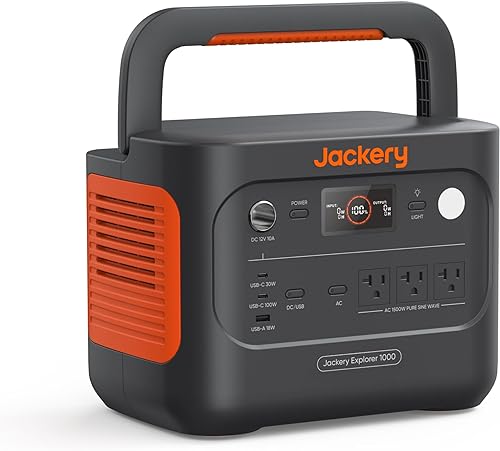
Buy the Jackery for trips where you move the station often and your appliances fit its output. It weighs 23.8 lb, which is 2.9 lb less than the EcoFlow, and has a foldable handle.
That difference matters most when you lift it repeatedly from a trunk, carry it upstairs or move it between rooms. Think through the whole route, including steps and uneven ground.
Its three pure sine wave AC outlets suit a modest plug-in setup. Two USB-C ports, one USB-A port and a DC car port also let you connect suitable devices without using every AC outlet.
The 100W USB-C output is useful for compatible laptops. A direct connection can remove a bulky wall adapter from your travel bag and avoid an extra power-conversion step.
Skip the Jackery if a required appliance exceeds its normal output or if you need more runtime than this battery size can provide. Also reconsider it if you already have solar panels from another brand, since its solar charging supports only Jackery panels.
Our Explorer 1000 v2 review gives you a closer look at this model.
Who should buy the EcoFlow Delta 3 Classic?
Buy the EcoFlow for appliances that need more running power or electronics that need a shorter backup transfer time. It is the better fit when the Jackery's output leaves too little room for your planned load.
At 26.7 lb, it asks more of you during frequent carrying. That tradeoff is easier to accept if the station mostly stays beside a desk or a designated backup area.
The EcoFlow app supports usage monitoring, charging schedules and backup modes, including Storm Alert and Self-Powered Mode. Set these around your routine so the station has charge available when you expect to need it.
Skip it if your setup consists mainly of small electronics and portability matters most. Higher output won't add much value when all your devices already fit comfortably within the Jackery's limit.
It is also a poor choice if your plan depends on adding a DELTA 2 Smart Extra Battery or Delta 3 Series Smart Extra Battery. Neither is compatible with the DELTA 3 Classic, so don't assume batteries work together because they share a brand name.
When is the Bluetti Elite 100 V2 worth considering?
Consider the Bluetti when you want higher appliance output with less carrying weight than the EcoFlow. It combines 1,024Wh capacity, 1,800W rated AC output and a 25 lb body.
That makes it a useful third option for car camping followed by occasional home backup. Its 10ms UPS switching and Wi-Fi and Bluetooth app control also support use around a desk or home network.
Bluetti says AC charging reaches 80% in about 45 minutes. It also offers a silent mode that the brand specifies at 30 dB, though that figure shouldn't be treated as a promise for every operating condition.
Skip it if your packing plan requires laying the station on its side. Keep the Elite 100 V2 upright during storage and transport, and secure it against tipping in your vehicle.
Our Bluetti Elite 30 V2 review covers a different model for readers considering other options from the brand. Its specifications don't apply to the Elite 100 V2.
Which charging setup fits your routine?
Choose charging around the time and power source you actually have. A short stop with access to an outlet is a different problem from several days away from mains power.
EcoFlow says AC charging reaches 80% in 45 minutes. Jackery says its emergency mode reaches a full charge in 1 hour, but those different charge targets prevent a direct speed ranking.
Jackery normally takes 1.7 hours for a full charge, which the brand says helps preserve battery health. You must enable emergency charging in the app before each use of the faster mode.
Use the normal mode when you have time, and learn the app controls before a trip. Also check that the outlet and circuit can support charging alongside anything else drawing power there.
How should you plan solar charging?
Choose a compatible panel system before relying on solar for daily power. Jackery's panel is separate, and EcoFlow's claimed 2.5-hour solar recharge uses an optional 500W panel.
Real charging varies with sun angle, shade, weather and panel placement. A panel's wattage is not a promise that it will deliver that power throughout the day.
Compare the energy your devices use each day with what you can realistically put back. Keep a mains-charging option in your plan when possible, and use our guide to charging a portable power station to plan your stops.
Which is better for outage backup?
The EcoFlow has the shorter specified UPS transfer time, under 10ms compared with the Jackery's 20ms. Choose according to what your connected equipment can tolerate, then confirm the setup works as intended.
A UPS feature switches the load to battery when mains power fails. It doesn't increase battery capacity, remove output limits or ensure that every device stays on during the transfer.
For a home office, total the computer, monitor, router and other essentials. Decide which devices truly need battery power, since a smaller load gives you more time to save work or wait for service to return.
For medical equipment, follow the equipment manufacturer's backup requirements. Transfer speed alone is not enough to establish suitability.
These stations are most useful when you choose a limited set of essential loads. Our portable power station vs generator guide explains the tradeoffs if your outage plan needs longer operation or more power.
How should you set up and care for either station?
Place the station on a dry, firm surface with clear airflow, then connect only the devices in your load plan. Keep vents clear of bedding, luggage and walls, and protect the unit from rain and standing water.
Before a trip or expected outage, charge it and learn how to turn on the outputs you need. Check app settings while mains power is available so you aren't learning the controls in the dark.
Connect appliances one at a time and watch the displayed draw. For cycling loads such as refrigerators, check operation through a full cycle rather than judging from the first few seconds.
Use suitable cables in good condition, and don't stack adapters to create more connections than your plan needs. Plug appliances into the station; never feed a home wall outlet from its AC output.
Both brands use lithium iron phosphate batteries, but their life claims differ. Jackery says its battery retains over 70% capacity after 4,000 cycles, while EcoFlow describes its cells as rated for more than 10 years of daily use.
Those claims don't establish equal service life. Follow each manual's storage and charging guidance, avoid prolonged heat, and check the charge periodically when the station sits unused.
Which buying mistakes matter most?
The biggest mistake is buying enough output but too little energy. A station may start your appliance successfully and still fall short of the hours you need.
Another mistake is sizing from one device while planning to connect several. Include chargers, lights and network gear, then consider which loads may start together.
Don't choose a station just because it can power a heater or cooking appliance. Heat uses energy quickly, so brief tasks may fit while hours of heating overwhelm your runtime plan.
Avoid confusing a fast partial charge with a full recharge. Compare the starting charge, target percentage and mode before deciding which charging claim fits your schedule.
Finally, don't buy accessories based only on brand names or connector shape. Confirm exact model compatibility, especially for solar panels and extra batteries.
If your device list is still uncertain, work through what size portable power station you need before ordering.
Jackery vs EcoFlow: make the final choice
Choose the Jackery if every required load fits and frequent carrying is your main concern. Choose the EcoFlow if higher appliance output or shorter UPS switching solves a specific need.
Choose the Bluetti if you want the EcoFlow's rated output with a lighter body and can keep it upright during transport. If none provides enough energy for your required hours, move to a larger capacity class.
Settle your Jackery vs EcoFlow decision with three checks: combined running watts, startup demand and required runtime. Once both models pass those checks, carrying weight and charging routine become useful tie-breakers.
For another comparison before you commit, read Anker vs Jackery power stations.
Sources
These links identify the exact models compared, so you can match the model name before ordering.
- Jackery Explorer 1000 v2: See it on Amazon
- EcoFlow Delta 3 Classic: See it on Amazon
- Bluetti Elite 100 V2: See it on Amazon
Frequently asked questions
Is Jackery or EcoFlow better for home backup?
The EcoFlow Delta 3 Classic is the stronger choice for higher appliance loads and faster UPS switching. Choose the Jackery Explorer 1000 v2 if your essential devices fit its output and you move the station often.
Neither choice removes the need to calculate runtime and check appliance startup demand.
Which is lighter, the Jackery or EcoFlow?
The Jackery Explorer 1000 v2 weighs 23.8 lb, compared with 26.7 lb for the EcoFlow Delta 3 Classic. That makes the Jackery 2.9 lb lighter, with a foldable handle for carrying.
Include cables and solar gear when judging the total load you'll move between your home, vehicle and campsite.
Does the Jackery Explorer 1000 v2 include a solar panel?
No, the Jackery Explorer 1000 v2 includes the station and user manual, with no solar panel included. It supports only Jackery solar panels for solar charging.
Choose a compatible panel before planning an off-grid trip, and allow for weaker sunlight, shade and changing weather when estimating daily charging.
Can the EcoFlow Delta 3 Classic work as a UPS?
Yes, the EcoFlow Delta 3 Classic switches to battery in under 10ms through its UPS feature. Confirm that your equipment can tolerate that transfer time and that its combined load fits the station.
For medical equipment, follow the equipment manufacturer's backup requirements rather than choosing by transfer speed alone.


