5 Best Portable Power Station Under $300 (October 2026)
The best portable power stations under 300 dollars include the Bluetti Elite 30 V2 for short outages, the Jackery Explorer 300 for mixed camping gear, and the Anker SOLIX C300 DC for USB-C travelers.
On this page (8 sections)
- Which is the best portable power station under 300 dollars for your needs?
- What should you check before buying a power station under 300 dollars?
- Can a power station under 300 dollars support home backup?
- Is a solar panel worth adding?
- How should you set up a compact power station before a trip?
- What care helps keep a small power station ready?
- Which common buying mistakes should you avoid?
- Which portable power station under 300 dollars should you choose?
The best portable power station under 300 dollars is the Bluetti Elite 30 V2 if you need AC outlets and enough output headroom for more demanding small devices. Choose the Jackery Explorer 300 for mixed camping gear or the Anker SOLIX C300 DC for USB-C travel.
This budget tier works best for phones, laptops, lights and selected outage essentials. A higher output rating lets you connect more demanding equipment, but it doesn't make a small battery last longer.
Our complete portable power station buying guide explains the main terms. If you already have a device in mind, use our power station size guide to work out its output and energy needs.
Our picks at a glance
-
1

-
2

-
3

Which is the best portable power station under 300 dollars for your needs?
The Bluetti Elite 30 V2 offers the strongest mix of AC output and backup features here. The closest alternatives make sense when their ports or charging methods better match the equipment you carry.
FineOwner compared battery capacity, continuous output, connections and recharge options, with extra weight on useful limits and accessory needs. The small capacity gap between most of these models matters less than choosing the right outputs.
Start with 3 questions: Does your equipment need a wall outlet, how much power does it draw, and when can you recharge? Those answers narrow the choices faster than the number of ports or the largest number on the box.
| Product | Best for | Capacity | Continuous output | USB-C output | Our score |
|---|---|---|---|---|---|
| Bluetti Elite 30 V2 | short outages | 288Wh | 600W | 140W | 8.8 |
| Jackery Explorer 300 | mixed camping gear | 292Wh | 300W | 100W | 8.7 |
| Anker SOLIX C300 DC | USB-C travelers | 288Wh | 300W DC and USB | 140W | 8.4 |
| VTOMAN FlashSpeed 300 | occasional camp charging | 230Wh | 300W | 100W | 6.9 |
| DARAN 288Wh Power Station | packed emergency kits | 288Wh | 350W | 60W | 6.6 |
Bluetti Elite 30 V2: Best for short outages
- 288Wh capacity
- 600W continuous output
- 1500W Power Lifting Mode
- 10ms UPS switchover
Choose it for short outages or trips that call for more AC output. Its battery still suits selected essentials rather than long appliance backup.
Pros
- Highest continuous AC output here
- 10ms UPS switchover
- Wall, car and solar recharge options
Cons
- Small battery limits runtime at high loads
- Power Lifting Mode does not replace the continuous output rating
Choose the Bluetti Elite 30 V2 for a router, laptop and other selected essentials, or for AC equipment that needs more output than the alternatives provide. Its 600W continuous output and 288Wh battery give it useful power headroom within a compact energy budget.
The separate 1500W Power Lifting Mode is not a general continuous rating for every appliance. Base your device plan on normal output, and confirm any special-mode compatibility before relying on it.
BLUETTI specifies a 10ms UPS switchover for backup use. Confirm that connected equipment can tolerate that interruption, especially if losing power would interrupt important work.
BLUETTI says its 380W wall charging mode reaches 80% in 45 minutes and a full charge in 70 minutes. That suits a short stop at home before leaving again.
Skip it if your main goal is running a substantial load for hours. Its higher output expands device choice, while runtime remains tied to the battery; our Bluetti Elite 30 V2 review covers that balance.
Jackery Explorer 300: Best for mixed camping gear
- 292Wh capacity
- 300W rated output
- Two AC outlets
- 100W USB-C PD port
A practical fit for campers carrying wall chargers, USB devices and car-powered gear. Choose it for that connection mix rather than a meaningful capacity advantage.
Pros
- Two AC outlets
- USB-C, USB-A and car connections
- Supports charging devices while recharging
Cons
- Solar panel sold separately
- Limited headroom for demanding AC devices
Choose the Jackery Explorer 300 when your camping bag includes a mix of wall chargers, USB devices and car-powered accessories. Its 292Wh battery and 300W rated output suit modest loads rather than heating or cooking appliances.
Connections include two AC outlets, a 100W USB-C PD port, two USB-A ports and a 120W car port. That mix lets you organize devices by their proper connection instead of routing everything through wall adapters.
The slight capacity lead over the similarly sized picks is too small to drive the decision. Choose it because its connections fit your kit, not because you expect a much longer evening of power.
Jackery supports charging devices while the station recharges, which can help when wall power is available for only part of a trip. A solar panel is separate.
Skip it if an appliance needs more AC headroom or your entire setup already runs through USB-C. Our Jackery Explorer 300 review takes a closer look at its charging options.
Anker SOLIX C300 DC: Best for USB-C travelers
- 288Wh capacity
- 300W total output
- Two 140W two-way USB-C ports
- Seven charging ports
Choose this DC-only model for laptops, phones and other gear that can charge without wall outlets. Its USB-C connections can reduce the adapters you carry.
Pros
- Two high-output two-way USB-C ports
- Four USB-C ports in total
- USB-C, car and solar recharge options
Cons
- No AC outlets
- Wall charger and shoulder strap are not included
- Specific solar panel limits
Choose the Anker SOLIX C300 DC for a laptop, phone, tablet and other equipment that accepts USB or compatible DC power. It has no AC outlets, so check every device before making it your only power source.
Its seven ports include two 140W two-way USB-C connections, another USB-C connection rated at 100W, a lower-power USB-C port, two USB-A ports and a car socket. Individual port ratings do not mean every port can supply its maximum at once.
For first-time USB-C activation, connect an 18W or higher USB-C PD charger to USB-C2 or USB-C3. A USB-C cable is included, but you'll need a suitable wall charger.
Solar charging requires 11–28V input through XT60, with Anker recommending its 60W or 100W panels. The PS30, PS200 and PS400 are excluded.
Skip it if even one essential device requires a household plug and lacks a supported DC option. Read our Anker SOLIX C300 DC review before building a USB-only travel kit.
VTOMAN FlashSpeed 300: Best for occasional camp charging
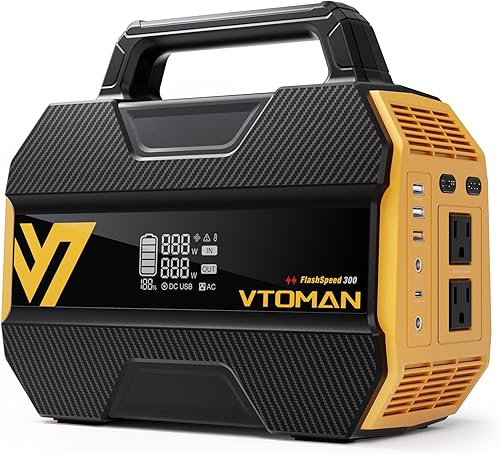
- 230Wh capacity
- 300W output
- 100W USB-C input and output
- Three-mode LED light
It suits short charging sessions for camping electronics, with AC outlets and a built-in light. Its smaller battery makes it less suitable for extended backup.
Pros
- Wall, solar, car and USB-C recharging
- Two AC outputs
- Includes car and USB charging cables
Cons
- Lowest battery capacity here
- Startup demand above 300W can trigger overload protection
Choose the VTOMAN FlashSpeed 300 for occasional camp charging when you want both AC connections and USB-C recharging. Its 230Wh battery is the smallest here, so it fits shorter sessions better than an extended outage plan.
It provides two AC outputs, 100W USB-C input and output, three USB-A ports and a DC connection. Wall, car and solar charging give you other ways to refill it.
VTOMAN says wall charging takes about 2.5 hours, while USB-C charging reaches 80% in about 2 hours. The included car and USB cables help you prepare a charging kit before departure.
The built-in light has steady, strobe and SOS modes. Keep a separate small light available so finding a cable doesn't depend on where the station is sitting.
Skip it if runtime is your main concern or your device has a difficult startup load. VTOMAN warns that startup demand above 300W can trigger overload protection, so a low running wattage alone isn't enough.
DARAN 288Wh Power Station: Best for packed emergency kits
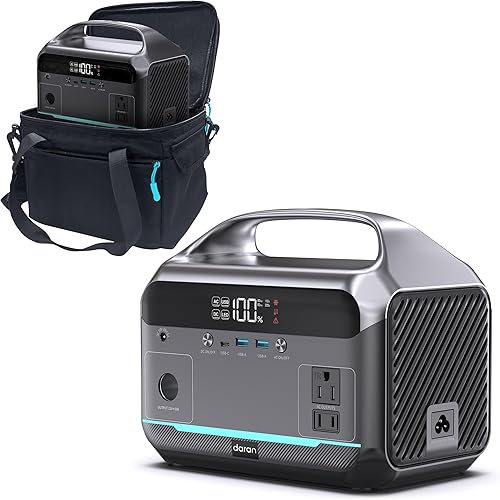
- 288Wh capacity
- 350W rated power
- 600W surge power
- Included storage bag
Its included bag, AC charging cable and rear light suit an organized emergency kit. Check accessory needs before planning car or solar recharging.
Pros
- Two AC outlets
- Rear LED with steady, strobe and SOS modes
- Storage bag included
Cons
- Solar panel and car cable sold separately
- Lower USB-C output than the other picks
- Brand calls for regular storage charging
Choose the DARAN 288Wh Power Station for an emergency kit that you keep packed and ready. Its included storage bag helps keep the AC charging cable and instructions together, while the rear light can help during a power cut.
It pairs 350W rated output with 600W surge power. The two AC outlets share the station's output allowance; they do not each provide that allowance independently.
Its other connections include 60W USB-C, two USB-A ports and DC. A laptop that needs more USB-C power may charge slowly or require its wall adapter, so check that match before choosing it.
Car and solar recharging need separate accessories, including a car charging cable. Add those to your preparation list if wall charging won't cover the trip.
Skip it if you want infrequent storage checks: DARAN calls for a full recharge every 1–2 months during long-term storage. At 8.2 lb, it is portable, but kit organization is a better reason to choose it than weight alone.
What should you check before buying a power station under 300 dollars?
Match connections, output and runtime, in that order. A battery with enough energy still won't help if it lacks the right outlet or cannot start the device.
Write down each essential device, its input type, its running watts and the hours you'll use it. Separate essentials from optional loads so a speaker or extra screen doesn't consume energy reserved for communications.
How much output does a portable power station under 300 dollars need?
Add the watts of devices that will run together, then leave some headroom for changing demand. Use the device's input requirements rather than the output printed on its charger.
For example, a laptop drawing 60W, a 10W light and a 15W router total 85W. Those are planning examples, and your own equipment may draw more or less.
Motors and compressors can need extra power when starting. A device that runs comfortably below the continuous limit may still fail to start if its surge demand is too high.
Also check each port's limit. A station's total output cannot make a low-power USB port charge a demanding laptop at full speed.
How much battery capacity is enough?
Calculate watt-hours needed, then allow for losses and a reserve. Multiply each device's watts by its hours of use and add the results.
A 40W device used for 4 hours needs 160Wh before conversion losses. Adding a 10W light for those same hours brings the total to 200Wh, leaving less room for charging phones or extending the evening.
For rough planning, a hypothetical 288Wh battery with an 80% usable-energy allowance provides about 230Wh. That would cover a steady 50W load for about 4.6 hours, but it is a calculation example rather than a runtime promise for these models.
Low loads can also lose a larger share of energy to the station's own operation. Our guide to how long a portable power station lasts explains why simple division needs adjustment.
Do you need AC outlets or mostly USB ports?
Choose AC for devices that require a wall plug, and use direct USB or DC connections when your equipment supports them. Avoiding an unnecessary wall adapter can reduce conversion losses and cable clutter.
Check USB-C charging support on both ends of the cable. A USB-C socket doesn't guarantee that the device accepts the voltage and power needed for fast charging.
If your needs stay modest, see what a 300W power station can run. For broader brand context, our Jackery vs EcoFlow comparison explains how to compare model families without assuming every model has the same features.
Can a power station under 300 dollars support home backup?
Yes, for selected small essentials during a short outage. Plan around a few devices you can power directly rather than household circuits or every appliance in a room.
A phone, router, light and laptop are sensible starting points. Keeping a router powered preserves your local network, but internet access still depends on the equipment and service beyond your home.
Prioritize loads by time: communications first, lighting when needed, then optional electronics. Charging a laptop battery and switching it off afterward may fit your plan better than keeping several devices plugged in all evening.
Refrigerators need both a startup check and a realistic energy estimate. A brief successful start doesn't establish that a small station will keep food cold through a long outage.
For a CPAP machine, check the exact model, power supply and humidifier or heated-tube settings. If uninterrupted operation is essential, confirm the backup plan with the equipment provider rather than relying on a general runtime example.
Read our guides to portable power stations for home backup and what a higher-output power station can run if your essential loads exceed this tier.
Is a solar panel worth adding?
A solar panel makes sense when you have daylight, space and time to recharge away from an outlet. For a single short trip with wall charging available, a panel may add more gear than you need.
Work out where it will sit before buying it. A shaded campsite, frequent driving or a schedule spent away from camp can make solar less useful than its rated output suggests.
Panel output changes with sun angle, clouds, shade and temperature. The station's input limit also caps what reaches the battery, so panel watts alone don't predict recharge time.
Match voltage range, connector and any required cable before connecting a panel. A matching plug by itself doesn't establish electrical compatibility.
If devices remain powered during solar charging, they use part of the incoming energy. The battery may refill slowly, stay level or continue dropping, depending on the balance between input and load.
Keep the station sheltered while placing the panel where it can collect sunlight. Outdoor use does not establish rain resistance for the battery unit.
How should you set up a compact power station before a trip?
Charge it and confirm your whole device setup works before departure. Include the same cables, adapters and devices you'll use away from home.
Check that each required output is switched on. Some stations have separate AC and DC controls, so a charged battery can still appear unresponsive if the relevant output is off.
Connect devices one at a time, then together. Watch the power display as a laptop starts charging or an appliance starts, and remove optional loads if demand approaches a limit.
Confirm the recharge method too. Bring the correct wall adapter or USB-C charger, and check whether the car cable is included rather than discovering a missing accessory on the road.
Store cables in a separate pouch and label similar-looking leads. Keep vents clear instead of operating the station inside its storage bag or beneath bedding.
Our guide to how to charge a portable power station explains the main recharge methods and how input power affects charging time.
What care helps keep a small power station ready?
Follow the model's storage and charging instructions, and check its charge before you need it. A battery left untouched for months may have less usable energy than you expect.
Switch off unused AC and DC outputs after charging your devices. Leaving an inverter or regulator active consumes energy even when nothing useful is connected.
Store the station in a dry place away from strong heat. A parked vehicle can become much hotter than the outside air, so it is a poor long-term storage spot.
Let the station return to an allowed temperature before charging after very cold or hot conditions. Use the manual's limits rather than assuming battery protection makes any environment suitable.
Check cables for damaged insulation, loose plugs or bent connectors. Keep liquids away from sockets, and stop using a unit that shows damage, swelling or unusual heat.
For placement and connection basics, read are portable power stations safe?.
Which common buying mistakes should you avoid?
The biggest mistakes are confusing watts with watt-hours, ignoring startup demand and planning around recharge gear you don't have. All three can leave a suitable-looking station unable to cover your actual needs.
Choosing the largest output number
Watts describe power delivery, while watt-hours describe stored energy. A station capable of running a larger load may empty sooner because that load consumes energy faster.
Treat surge and special output modes as separate features. They do not turn a compact battery into a larger energy supply.
Treating every outlet as a separate power allowance
Multiple outlets share the station's total limits. Connecting two appliances does not double available AC power, and several USB devices may share an output budget.
Count simultaneous loads before connecting them. If the station trips, remove the cause rather than repeatedly restarting the same overloaded setup.
Expecting heating appliances to fit a small battery
Kettles, space heaters and other heating devices often need more power than compact stations can provide. Even a compatible low-power heating load can consume the battery quickly.
For camping, plan another suitable cooking method. Save stored electricity for equipment that is harder to replace with a simpler option.
Buying for an imaginary future setup
Choose for the devices you will actually carry or protect during an outage. Extra ports are useful only when their type and power match that equipment.
Include chargers, adapters, panels and cables in your decision. A station that fits your budget alone may require accessories before it can serve the purpose you bought it for.
Which portable power station under 300 dollars should you choose?
Choose the Bluetti Elite 30 V2 for AC headroom and short-outage backup, the Jackery Explorer 300 for mixed camping connections, or the Anker SOLIX C300 DC for a USB-C setup. Your essential device's connection should decide between them.
The VTOMAN FlashSpeed 300 fits occasional charging when its smaller battery covers your plan. Choose the DARAN 288Wh Power Station for a packed emergency kit if its connections and storage routine suit you.
Before choosing the best portable power station under 300 dollars, write down your required runtime and next recharge opportunity. If the energy calculation falls short, reduce the loads or choose a larger battery using our power station size guide.
Our top 3 picks at a glance
-
1
-
2
-
3
Frequently asked questions
Can a portable power station under 300 dollars run a refrigerator?
Some can run a compatible refrigerator briefly, but startup demand and battery capacity are the main limits. Check the appliance's running watts and surge needs before choosing a station, then allow for conversion losses when estimating runtime.
Our guide to portable power stations and refrigerators explains the checks.
Is 300W enough for a portable power station?
A 300W station is enough for a group of small devices whose combined demand stays below its output limit. Phones, laptops and lights are sensible uses, provided each connection also meets the device's needs.
Motors and compressors need a separate startup check, while most heating appliances call for much more power.
Do these power stations include solar panels?
Don't assume a solar panel is included just because a station supports solar charging. Plan for a separate compatible panel and any required cable unless your chosen package explicitly includes them.
Match voltage, connector and input limits before buying; a panel with a higher wattage is not automatically a suitable match.
How do I estimate runtime?
Divide usable battery energy in watt-hours by the total device draw in watts. Use a reduced energy allowance rather than the full battery capacity, since conversion losses and the station's own power use consume energy.
Our portable power station runtime guide explains how changing loads affect the result.


