5 Best Portable Power Station for Power Outages (October 2026)
The best portable power stations for power outages include the Jackery Explorer 1000 v2 for mixed household essentials, the Bluetti Elite 30 V2 for short desk outages, and the Jackery Explorer 300 for light plug-in essentials.
On this page (8 sections)
- The best portable power stations for power outages
- Which portable power station fits your essential devices?
- How should you size a power station for an outage?
- Does UPS backup keep everything running through a blackout?
- How should you prepare a power station before an outage?
- How can you recharge during a long power outage?
- Which mistakes waste battery power during an outage?
- Which power station should you choose for your outage plan?
The Jackery Explorer 1000 v2 is the best portable power station for most power outages because it balances household appliance support, useful battery capacity and manageable carrying weight. Choose the Bluetti Elite 30 V2 for a small desk backup setup, or the Bluetti AC180 when appliance output matters most.
Start with what you need to keep working: food storage, communication, lighting or work equipment. A station that suits a router and laptop may be a poor choice for a refrigerator, even if both fit into the same room.
For broader guidance, see our portable power station buying guide. If food storage is your priority, our guide to running a refrigerator from a power station explains the checks that matter.
Our picks at a glance
-
1
-
2

-
3

The best portable power stations for power outages
The Jackery Explorer 1000 v2 ranks first for a mixed household backup plan. The other picks suit more focused needs, so use the comparison to match your devices rather than choosing by rank alone.
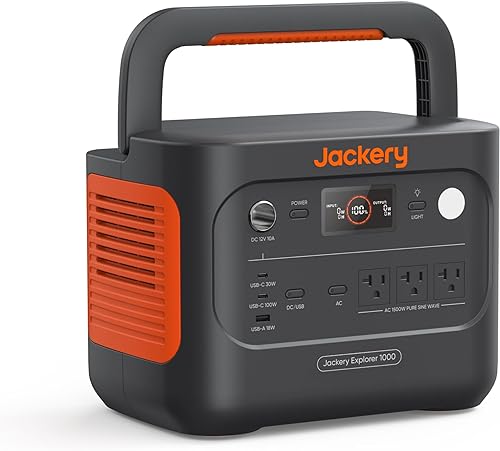
Jackery Explorer 1000 v2: Best for mixed household essentials
- 1,070Wh capacity
- 1,500W AC output
- 3,000W surge peak
- LFP battery
Choose this for a mix of small electronics and compatible household appliances. Its foldable handle makes it practical to move between storage and your backup area.
Pros
- Three pure sine wave AC ports
- 100W USB-C charging
- App offers several charging modes
Cons
- Solar panel sold separately
- Emergency charging must be enabled before each use
Bluetti Elite 30 V2: Best for short desk outages
- 288Wh capacity
- 600W continuous output
- 1,500W Power Lifting mode
- 10ms UPS switchover
A compact choice for keeping compatible desk electronics powered through short interruptions. Its small battery favors a focused backup plan over several household appliances.
Pros
- 10ms UPS switchover
- 380W wall charging
- Bluetooth and Wi-Fi app control
Cons
- Small battery limits longer backup
- Power Lifting is separate from continuous output
Jackery Explorer 300: Best for light plug-in essentials
- 292Wh capacity
- 300W rated output
- 600W peak surge
- 100W USB-C PD port
Pick this for modest loads that need standard AC plugs alongside USB charging. Skip it if your outage plan includes high-draw kitchen appliances.
Pros
- Two AC outlets
- 100W USB-C PD port
- Can power devices while recharging
Cons
- Limited appliance output
- Solar panel sold separately
Bluetti AC180: Best for demanding appliance loads

- 1,152Wh capacity
- 1,800W output
- 2,700W boost mode
- 20ms UPS backup
Its higher continuous output suits compatible appliances that exceed the smaller picks' limits. Choose it when you can keep the station near its working location.
Pros
- Highest continuous output among these picks
- Solar input up to 500W
- AC, car and solar charging cables included
Cons
- Heaviest pick
- Higher output does not guarantee long runtime
Anker SOLIX C300 DC: Best for USB-powered households

- 288Wh capacity
- 300W output
- Two 140W two-way USB-C ports
- Seven device charging ports
A focused backup battery for compatible phones, tablets, laptops and other DC devices. It has no AC outlets, so every planned device needs a suitable USB or DC connection.
Pros
- Two 140W two-way USB-C ports
- Seven device charging ports
- Solar and car charging supported
Cons
- No AC outlets
- USB-C wall charger not included
FineOwner compared battery capacity, continuous output, charging options, connections and backup features. Higher output earns its place when an appliance needs it; low weight matters more when you must carry the station downstairs or between rooms.
| Product | Best for | Capacity | AC output | Weight | Our score |
|---|---|---|---|---|---|
| Jackery Explorer 1000 v2 | mixed household essentials | 1,070Wh | 1,500W, 3,000W surge peak | 23.8 lb | 9.2 |
| Bluetti Elite 30 V2 | short desk outages | 288Wh | 600W continuous, 1,500W Power Lifting mode | About 9.5 lb | 8.8 |
| Jackery Explorer 300 | light plug-in essentials | 292Wh | 300W, 600W peak surge | 8.7 | |
| Bluetti AC180 | demanding appliance loads | 1,152Wh | 1,800W, 2,700W boost mode | 37.4 lb | 8.5 |
| Anker SOLIX C300 DC | USB-powered households | 288Wh | 2.8 kg | 8.4 |
Which portable power station fits your essential devices?
Choose the station that supports your priority load before considering extra ports or fast charging. Each pick below has a clear role, along with limits that should rule it out for some households.
Jackery Explorer 1000 v2: Best for mixed household essentials
- 1,070Wh capacity
- 1,500W AC output
- 3,000W surge peak
- LFP battery
Choose this for a mix of small electronics and compatible household appliances. Its foldable handle makes it practical to move between storage and your backup area.
Pros
- Three pure sine wave AC ports
- 100W USB-C charging
- App offers several charging modes
Cons
- Solar panel sold separately
- Emergency charging must be enabled before each use
The Jackery Explorer 1000 v2 suits a household that wants one station for several kinds of essentials. Its 1,070Wh battery, 1,500W continuous AC output and 3,000W surge peak provide room for compatible appliances alongside smaller electronics.
Three pure sine wave AC outlets cover standard plugs, while USB and car connections let you charge suitable devices directly. A laptop that accepts USB-C can use its 100W connection without occupying an AC outlet.
At 23.8 lb, it requires a deliberate lift, but the foldable handle helps when moving it from storage. Choose a location you can reach easily during a blackout rather than storing it behind heavy boxes.
Jackery specifies a full charge in 1.7 hours by default, or one hour with emergency charging enabled in the app before each charge. Set up the app while grid power is available so that option is ready.
Buy it for mixed essentials and occasional moves around the home. Skip it if your main load exceeds its continuous output, and account for a separately sold Jackery panel if solar charging is part of your plan.
Bluetti Elite 30 V2: Best for short desk outages
- 288Wh capacity
- 600W continuous output
- 1,500W Power Lifting mode
- 10ms UPS switchover
A compact choice for keeping compatible desk electronics powered through short interruptions. Its small battery favors a focused backup plan over several household appliances.
Pros
- 10ms UPS switchover
- 380W wall charging
- Bluetooth and Wi-Fi app control
Cons
- Small battery limits longer backup
- Power Lifting is separate from continuous output
The Bluetti Elite 30 V2 suits short interruptions at a desk or a focused communication station. Its 288Wh battery and 600W continuous output pair a small energy reserve with enough output for compatible modest loads.
The 10ms UPS switchover is its main advantage for equipment you want connected before an outage. Check transfer-time requirements first, since a brief switch can still interrupt equipment that needs a different type of backup.
At about 9.5 lb, it's easier to carry between rooms than the larger picks. Bluetooth and Wi-Fi app control also provide ways to monitor and adjust it.
Bluetti specifies a full wall charge in 70 minutes, which helps when utility power returns only briefly. Its 1,500W Power Lifting mode is separate from normal continuous output and requires a compatible load.
Choose it for a narrow backup job, such as a compatible router and work setup. Skip it for long appliance outages: being able to start a device doesn't mean this small battery can keep it running through the night.
Jackery Explorer 300: Best for light plug-in essentials
- 292Wh capacity
- 300W rated output
- 600W peak surge
- 100W USB-C PD port
Pick this for modest loads that need standard AC plugs alongside USB charging. Skip it if your outage plan includes high-draw kitchen appliances.
Pros
- Two AC outlets
- 100W USB-C PD port
- Can power devices while recharging
Cons
- Limited appliance output
- Solar panel sold separately
The Jackery Explorer 300 fits buyers who need standard plugs for a few low-power essentials. Its 292Wh battery and 300W rated output place it closer to a device backup station than a general household appliance source.
Two AC outlets, a 100W USB-C PD port, two USB-A ports and a 120W car port cover several connection types. Use direct USB charging where your device supports it, leaving the AC outlets for equipment that needs them.
Its 600W peak surge doesn't raise the continuous limit, and every connected load shares the available output. A small appliance can consume most of that allowance before you add anything else.
The Explorer 300 can supply devices while it recharges, which is useful when power returns and you still need your setup running. Solar charging needs a separate panel.
Choose it for light plug-in essentials rather than cooking or broad refrigerator backup. Before assigning any small station to food storage, use our refrigerator wattage guide to identify the actual load.
Bluetti AC180: Best for demanding appliance loads
- 1,152Wh capacity
- 1,800W output
- 2,700W boost mode
- 20ms UPS backup
Its higher continuous output suits compatible appliances that exceed the smaller picks' limits. Choose it when you can keep the station near its working location.
Pros
- Highest continuous output among these picks
- Solar input up to 500W
- AC, car and solar charging cables included
Cons
- Heaviest pick
- Higher output does not guarantee long runtime
The Bluetti AC180 is the choice here when a compatible appliance needs more continuous power. Its 1,152Wh battery and 1,800W output give it the highest capacity and normal output among these picks.
The extra capacity over the top pick is modest, so choose it mainly for appliance compatibility rather than expecting a huge runtime gain. At 37.4 lb, it works best when you can leave it near the devices it will supply.
It offers a 20ms UPS switchover and a separate 2,700W boost mode. Check equipment requirements for either feature rather than treating them as permission to connect any demanding load.
Solar input reaches 500W, and Bluetti specifies a full wall charge in one hour using 1,440W AC input. That charging demand deserves attention if other appliances share the circuit.
Buy it for higher-output needs and a mostly fixed backup location. Skip it if lifting and carrying are major concerns; use our power station size guide to check whether you need its output.
Anker SOLIX C300 DC: Best for USB-powered households
- 288Wh capacity
- 300W output
- Two 140W two-way USB-C ports
- Seven device charging ports
A focused backup battery for compatible phones, tablets, laptops and other DC devices. It has no AC outlets, so every planned device needs a suitable USB or DC connection.
Pros
- Two 140W two-way USB-C ports
- Seven device charging ports
- Solar and car charging supported
Cons
- No AC outlets
- USB-C wall charger not included
The Anker SOLIX C300 DC suits a household whose priority devices charge through USB or compatible DC connections. Its 288Wh battery and 300W total output serve seven charging ports, with no AC outlets.
Two 140W two-way USB-C ports are useful for compatible laptops and recharging. Individual port limits still apply, and adding their maximum ratings together doesn't increase the station's total output.
At 2.8 kg, it's a practical choice for keeping personal electronics together in a ready-to-carry setup. Confirm that each laptop accepts USB-C charging at a suitable power level before relying on that connection.
For first activation by USB-C, connect an 18W or higher USB-C PD wall charger to USB-C2 or USB-C3. A 140W cable is included, but a wall charger isn't.
Solar charging requires an 11 to 28V panel with an XT60 connector; Anker warns against panels over 100W and excludes the PS30, PS200 and PS400. Choose it for compatible personal electronics, and skip it if even one essential device requires a standard wall plug.
How should you size a power station for an outage?
Size output for what runs together and battery capacity for how long it must run. These are separate decisions, and getting either one wrong can leave an essential device without power.
Match the best power station for an outage to your loads
Make a short list of must-run devices, then a separate list of things you can do without. A refrigerator, communication equipment and a lamp may deserve battery energy ahead of a television or coffee maker.
Record each device's connection type, running watts, startup needs and required hours. A wall plug alone doesn't tell you how demanding the device is.
Add the running watts of everything you expect to use at once. Leave headroom for changing demand instead of building a plan that sits exactly at the station's limit.
For motor-driven equipment, check the starting requirement separately. The guide to refrigerator power use explains why steady running power doesn't capture the whole job.
Don't treat Power Lifting or boost figures as interchangeable with a conventional surge rating. Use those modes only for loads supported by the manufacturer's instructions.
Calculate energy before choosing a battery
Multiply a device's average watts by the hours you need it to run. Add those watt-hour totals for a rough energy budget.
For example, a 40W combined load running for 6 hours uses 240Wh at the devices. The battery needs to supply more because the station also consumes energy and AC conversion has losses.
That example is a planning calculation, not a runtime promise for any pick here. Small batteries can handle low-power devices yet leave little reserve when several run together.
Cycling appliances need more care because their demand changes. Energy measured over a representative period is more useful than multiplying a refrigerator's running watts by every hour of the outage.
Use our portable power station runtime guide to work through the calculation. Plan a reserve for delays in recharging rather than aiming to finish with an empty battery.
Separate appliance power from appliance runtime
A large inverter can run a demanding load while the battery drains quickly. A small inverter can stretch the same stored energy across modest devices but may refuse a larger appliance entirely.
As a simple example, a steady 1,000W load uses 1,000Wh in an hour before losses. That makes electric heating and long cooking sessions difficult jobs for batteries in this size range.
Use another suitable way to cook or stay warm when possible. Reserve the station for the functions you cannot easily replace.
Does UPS backup keep everything running through a blackout?
A UPS function can switch compatible equipment to battery power, but transfer time is only one part of the decision. You also need enough output, battery energy and the correct operating mode.
For a desk setup, consider everything required for the task. A powered laptop won't restore internet access if the modem, router or the provider's network has lost service.
Check the station's instructions for leaving it connected to wall power and supplying devices continuously. Review any settings that could shut off an output when the load is very low.
For medical equipment, confirm power quality, transfer-time and runtime requirements with the equipment manufacturer. Keep a separate care plan rather than assuming a consumer backup feature meets every requirement.
A practical check before storm season is to confirm that your intended setup behaves as expected when wall power is removed. Follow both devices' instructions, and do this while another suitable power source is available.
How should you prepare a power station before an outage?
Prepare one clear backup location and a ready set of cables before the lights go out. This saves battery energy and avoids sorting through adapters in the dark.
Set up the station and its connections
Read the manual, complete activation and charge the station according to the manufacturer's instructions. Install any app needed for settings while your phone and home internet have power.
Place the station on a stable, dry surface with its vents clear. Keep it away from sinks, flood-prone floors, direct heat and anything that could fall across the cooling openings.
Put suitable charging cables and any needed adapters in a labeled bag nearby. Check that cables reach the devices without creating a trip hazard.
If an extension cord is necessary, choose one rated for the load and follow its instructions. Avoid damaged cords, overloaded power strips and cable runs through wet areas.
Connect appliances directly to the station or through suitable cords. Never feed a wall outlet from the station; supplying home circuits requires proper transfer equipment and professional installation.
Our portable power station safety guide covers placement and connection precautions in more detail.
Write a simple household use plan
Label the devices that get priority and note which can run together. Anyone at home should be able to follow the plan without repeating your power calculations.
Decide who will monitor charge and when to reduce optional use. Keeping one person aware of the remaining reserve helps prevent several people from adding loads at once.
Keep a separate flashlight accessible so you can connect devices safely. Don't bury the power station beneath emergency supplies that block access or ventilation.
How can you recharge during a long power outage?
Plan a compatible charging source and a realistic energy budget before buying extra equipment. Solar and car charging help only when the connections work and enough energy returns to cover your essentials.
Treat solar as a variable source
A panel's rated output isn't a promise of steady charging through clouds, shade or short winter days. Place panels where they receive useful sunlight while keeping the station itself dry and within its operating limits.
Check panel voltage, connector type, cable requirements and maximum input. A connector that physically fits doesn't prove the electrical setup is suitable.
The Explorer 1000 v2 requires Jackery solar panels. The AC180 accepts compatible panels with 12 to 60V open-circuit voltage within its solar input limit, giving buyers more panel choices.
Buy the necessary cables before an outage and check the planned connections. Our guide to charging a portable power station explains the common recharge methods.
Use available charging windows well
When utility power returns, recharge essentials and the station before optional devices. Follow the station's input instructions, and consider the other loads already using the same household circuit.
Fast charging helps only when the supply can support it. A lower charging setting may fit a shared circuit better where the station offers that choice.
For car charging, follow both the vehicle and station instructions and avoid draining the vehicle's starting battery. If the engine must run, keep the vehicle outdoors away from doors, windows and attached garages.
If your plan requires high energy use for several days, compare the wider options in our power station versus generator guide. Stored battery energy and a fuel supply solve different parts of a long outage.
Which mistakes waste battery power during an outage?
The biggest mistakes are running optional loads, leaving unused outputs active and expecting maximum runtime from a full battery. A short priority list is more useful than filling every port.
Letting convenience loads use the reserve
Brief appliance use can be reasonable when it fits the output limit, but repeated heating or cooking can consume energy meant for overnight essentials. Decide on that tradeoff before connecting the appliance.
Charge phones and laptops through suitable direct connections when possible. Converting battery power to AC and then back through a device's adapter adds another conversion step.
Turn off unused output groups when the instructions allow it. The station's own power use matters most when the connected load is small and must run for many hours.
Assuming every device can share full power
Port ratings are individual limits, while the station also has a combined output ceiling. Check both when charging several laptops or adding an appliance to an existing setup.
Watch for loads that start automatically, such as a compressor cycling on. A setup that works during a quiet moment may face a higher combined demand later.
Avoid repeatedly reconnecting a device after an overload shutdown. Reduce the load and check compatibility before trying again.
Leaving the station forgotten between storms
Follow the manufacturer's storage charge, temperature and maintenance guidance. Check the battery periodically rather than discovering a low charge after utility power fails.
Inspect cords and the enclosure for damage, and keep vents clear of dust. Stop using a unit with swelling, unusual heat or visible damage and seek manufacturer guidance.
Battery cycle-life claims don't replace routine care. A backup station also needs working cables, correct settings and enough stored energy on the day you need it.
Which power station should you choose for your outage plan?
The best portable power station for a power outage is the one that covers your priority devices for the hours you need, with a practical way to recharge. Use the hardest essential load to narrow the choices, then compare energy needs and carrying weight.
- Choose the Jackery Explorer 1000 v2 for mixed household essentials and occasional movement between rooms.
- Choose the Bluetti Elite 30 V2 for a compact, compatible desk setup during shorter interruptions.
- Choose the Jackery Explorer 300 for light loads that need AC outlets as well as USB charging.
- Choose the Bluetti AC180 when a compatible appliance needs higher continuous output and the station can stay near its working location.
- Choose the Anker SOLIX C300 DC when your essential devices all work through suitable USB or DC connections.
If your energy calculation leaves too little reserve, move to a larger backup plan instead of relying on a boost mode or optimistic solar charging. Our best portable power stations for home backup guide is the next step for comparing broader household needs.
Our top 3 picks at a glance
-
1
-
2
-
3
Frequently asked questions
What size portable power station do I need for a power outage?
Choose output for the devices you need to run together and capacity for the hours you need them. Add their running watts, check startup demand separately, then estimate energy use in watt-hours.
Allow room for conversion losses, the station's own power use and a reserve if the outage lasts longer.
Can a portable power station run a refrigerator during an outage?
Yes, if the refrigerator's running and starting demand fit the station's output limits. Capacity then determines how long the battery can support it.
A refrigerator cycles rather than drawing full power constantly, so measured energy use over several hours is more useful for runtime planning than its running wattage alone.
How long will a portable power station last during a blackout?
Runtime depends on usable battery energy and the average draw of your devices. Divide usable watt-hours by average watts for a rough estimate.
For AC loads, account for conversion losses and the station's own consumption, and leave a reserve instead of planning to use every remaining bit of charge.
Can I recharge a power station during a long outage?
Yes, solar or car charging can help if the station supports the equipment you use. Match the panel voltage, connector, input limits and cables before an outage.
Sunlight and charging conditions affect how much energy returns, so build your plan around essential loads rather than assuming a full recharge every day.