5 Best Solar Generator for Home Backup (October 2026)
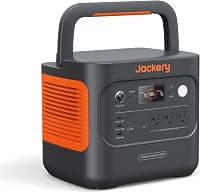
The best solar generators for home backup include the Jackery Solar Generator 1000 v2 for portable essentials backup, the EcoFlow Delta 3 Classic with 220W Panel for desk equipment backup, and the EcoFlow Delta 3 Max with 220W Panel for extended workday backup.
On this page (10 sections)
- How we chose the best solar generators for home backup
- Which solar generator suits each backup plan?
- How much battery capacity do your essentials need?
- How much output do appliances need at the same time?
- Can the included solar panels keep up during an outage?
- How should you connect and prepare a home backup setup?
- How do you care for a solar generator between outages?
- What mistakes shorten useful backup time?
- Are solar generators safe to use indoors?
- Which solar generator is best for your home backup plan?
The Jackery Solar Generator 1000 v2 is our best solar generator for home backup for a few essentials when easy carrying matters. Choose a larger HomePower model for a longer energy reserve, or the EcoFlow Delta 3 Classic for compatible equipment that benefits from quick battery transfer.
A solar generator package combines a battery power station with panels. The battery supplies power immediately; the panels replenish it when sunlight allows, so your plan needs to cover both overnight use and daytime recovery.
Start with our portable power station buying guide if you're still comparing station types. Our home backup power station guide gives a broader view of outage setups.
Our picks at a glance
-
1
 Best for portable essentials backup
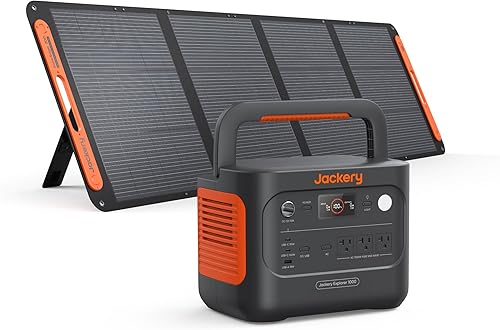
Jackery Solar Generator 1000 v2
8.2/10 our score
See it on Amazon -
2
 Best for desk equipment backup
EcoFlow Delta 3 Classic with 220W Panel
7.9/10 our score
See it on Amazon -
3
 Best for extended workday backup
EcoFlow Delta 3 Max with 220W Panel
7.3/10 our score
See it on Amazon
- 4
 Check it
Jackery HomePower 3600 Plus with Panels
Best for longer essential-load outages - 5
 Check it
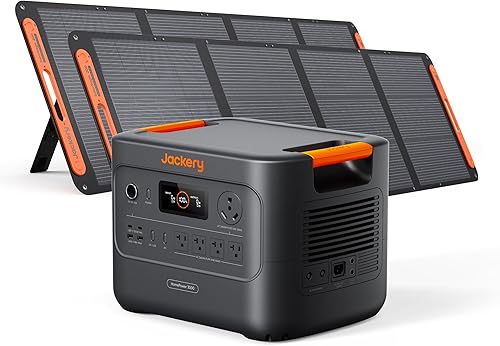
Jackery HomePower 3000 with Panels
Best for fridge and network backup
How we chose the best solar generators for home backup
We compared stored energy, standard output, included panels and backup features, with extra attention to how easily each package fits an essential-load plan. The smaller Jackery leads for portable backup, while the larger models serve households with greater energy needs.
Rank does not replace sizing. A household keeping a refrigerator and work equipment running overnight should choose enough battery capacity, even if that means picking farther down the list.
We also separated normal output from surge and special output modes. A larger advertised wattage is useful only when it applies to the appliance and operating conditions you need.
| Product | Best for | Capacity | AC output | Included panels | Our score |
|---|---|---|---|---|---|
| Jackery Solar Generator 1000 v2 | portable essentials backup | 1,070Wh | 1,500W | One 200W panel | 8.2 |
| EcoFlow Delta 3 Classic with 220W Panel | desk equipment backup | 1,024Wh | 1,800W | One 220W panel | 7.9 |
| EcoFlow Delta 3 Max with 220W Panel | extended workday backup | 2,048Wh | 2,400W; 3,400W X-Boost mode | One 220W panel | 7.3 |
| Jackery HomePower 3600 Plus with Panels | longer essential-load outages | 3,584Wh | 3,600W | Two 200W panels | 7.2 |
| Jackery HomePower 3000 with Panels | fridge and network backup | 3,072Wh | 3,600W | Two 200W panels | 7.0 |
Which solar generator suits each backup plan?
Choose the smaller stations for a short list of essentials, the Delta 3 Max for a larger daily energy budget, and the HomePower models for more reserve. Decide which appliances stay connected before choosing a package.
Jackery Solar Generator 1000 v2: best solar backup for portable essentials
Jackery Solar Generator 1000 v2: Best for portable essentials backup
- 1,070Wh capacity
- 1,500W AC output
- 200W solar panel included
- 23.8 lb power station
Choose this compact package for lights, communication devices and selected appliance use. Its lower weight makes it easier to move, but the battery calls for a short essential-load list.
Pros
- 23.8 lb power station with folding handle
- Three pure sine wave AC ports
- LFP battery
Cons
- Limited energy reserve for several appliances
- Jackery quotes 6 hours to 80% with the included panel
Choose this Jackery for communication, lighting and selected appliance use when you need a station you can move between rooms. Its 1,070Wh battery and 1,500W AC output suit a focused backup plan rather than several hungry appliances running together.
The station weighs 23.8 lb and has a folding handle. Three pure sine wave AC ports support plug-in equipment, while USB-C connections let you charge compatible devices without their AC adapters.
Jackery says the included 200W panel can bring the battery to 80% in 6 hours under suitable conditions. Default AC charging takes 1.7 hours, with a claimed one-hour emergency charge that you must enable in the app before each use.
That quick wall recharge is useful when power returns briefly between outages. Keep the app ready before storm season so you can select the charging mode without working through setup during a blackout.
Skip it for a long multi-appliance outage unless your energy calculation leaves room. It can supply a capable appliance without having enough stored energy to run that appliance for the entire night.
EcoFlow Delta 3 Classic with 220W Panel for desk equipment
EcoFlow Delta 3 Classic with 220W Panel: Best for desk equipment backup
- 1,024Wh capacity
- 1,800W output
- 220W solar panel included
- EcoFlow claims under-10ms UPS transfer
A fit for buyers who want quick battery transfer for compatible desk equipment and enough output for selected appliances. Its battery suits short outages better than prolonged multi-appliance use.
Pros
- Higher standard output than the smaller Jackery
- 220W bifacial panel included
- EcoFlow claims UPS transfer under 10ms
Cons
- Small energy reserve beside the larger picks
- Power station and panel ship separately
Choose the Delta 3 Classic when quick transfer for compatible desk equipment matters more than a large overnight reserve. Its 1,800W standard output provides room for selected higher-power loads, but the 1,024Wh battery still needs a tight energy budget.
EcoFlow claims an under-10ms UPS transfer. Check the backup requirements of your computer and other equipment, then confirm that the planned connection works before relying on it during an outage.
EcoFlow quotes 45 minutes from empty to 80% through AC charging. It also quotes a 5.8-hour solar recharge with the included 220W bifacial panel, which depends on suitable sunlight and placement.
This package fits a desk-focused plan where the monitor, computer, router and charging devices take priority. Keep occasional appliance use separate so a brief high-power task does not consume the reserve needed for work.
Skip it if longer runtime is your main goal. Its output advantage over the smaller Jackery does not mean a larger energy supply, and the station and panel arrive separately.
EcoFlow Delta 3 Max with 220W Panel for a longer workday
EcoFlow Delta 3 Max with 220W Panel: Best for extended workday backup
- 2,048Wh capacity
- 2,400W standard output
- 220W solar panel included
- App charging and discharge schedules
A middle option for buyers whose work equipment and household essentials need more stored energy than a small station provides. Plan loads around standard output and allow enough time for solar recovery.
Pros
- More stored energy than the smaller stations
- App energy monitoring and schedules
- EcoFlow claims transfer under 10ms
Cons
- Higher output figure depends on X-Boost mode
- One included panel must replenish a larger battery
Choose the Delta 3 Max when your load calculation outgrows the smaller batteries but does not call for the largest Jackery packages. Its 2,048Wh capacity gives work equipment and household essentials a larger shared energy budget.
Use its 2,400W standard output for your initial appliance match. EcoFlow promotes 3,400W through X-Boost mode, so check the operating guidance and appliance requirements before depending on that higher figure.
EcoFlow claims transfer in under 10ms and AC charging from empty to 80% in 1.13 hours. App controls support energy monitoring and charging or discharging schedules, which help you keep track of how quickly connected loads use the reserve.
The included 220W panel needs enough productive daylight to replenish this larger battery. A package can offer more stored energy without offering a matching increase in daily solar collection.
Skip it if you expect one panel to restore heavy overnight use every day. Choose it for the battery reserve first, then work out whether your available sun and charging options support repeated outages.
Jackery HomePower 3600 Plus with Panels for longer outages
Jackery HomePower 3600 Plus with Panels: Best for longer essential-load outages
- 3,584Wh capacity
- 3,600W output
- Two 200W panels included
- Wheels and telescopic handle
The largest single-unit battery here suits buyers who prioritize a larger outage reserve. Its rolling design helps on suitable floors, but moving it between levels requires planning.
Pros
- Largest single-unit capacity in this group
- Capacity expansion options
- Wheels and telescopic handle
Cons
- 77.2 lb station
- Jackery's 4-hour solar claim needs confirmation of the required panel setup
Choose the HomePower 3600 Plus when the largest single-unit energy reserve here matters more than easy lifting. It pairs 3,584Wh capacity with 3,600W output and includes two 200W panels.
Wheels and a telescopic handle help you move the 77.2 lb station across a suitable floor. Pick its storage and operating locations before buying, especially if your home has stairs or raised doorways.
Jackery quotes a full AC recharge in 2.5 hours or 2 hours with combined AC and DC charging. Its separate 4-hour solar recharge claim needs confirmation of the required panel setup before you use that time in an outage plan.
Jackery offers expansion up to 21kWh per unit or 43kWh with multiple units. Those capacities need additional equipment; this bundle alone does not provide them.
Skip it for frequent stair carrying or a small electronics-only load. Also, do not assume its parallel 240V option is available from one station: that arrangement requires compatible additional equipment and a suitable connection plan.
Jackery HomePower 3000 with Panels for grouped home essentials
Jackery HomePower 3000 with Panels: Best for fridge and network backup
- 3,072Wh capacity
- 3,600W output
- Two 200W panels included
- Jackery claims UPS transfer within 20ms
Choose this package for a planned group of home essentials when you want more stored energy than the EcoFlow models. It is lighter than the HomePower 3600 Plus, though still a substantial lift.
Pros
- Large energy reserve for essential loads
- AC, USB-C, USB-A and DC connections
- Built-in TT-30 RV port
Cons
- 59.5 lb station
- Jackery quotes 9 hours to 80% with the included panels
Choose the HomePower 3000 for a planned group of household essentials when you want a large reserve with less weight than the HomePower 3600 Plus. Its 3,072Wh battery and 3,600W output suit buyers who have already calculated their appliance demand.
The station weighs 59.5 lb, so decide who will move it and where it will sit. AC, USB-C, USB-A and DC connections support different device types, while the built-in TT-30 port also serves compatible RV use.
Jackery claims UPS transfer within 20ms. Check each device's requirements before using that feature for equipment that needs continuous power.
With the two included 200W panels, Jackery quotes 9 hours to reach 80%. A full recharge takes a claimed 2.2 hours through AC or 1.7 hours through combined AC and DC charging.
Skip it if you need easy one-person carrying or quick solar recovery from empty. Its larger battery helps overnight, but you still need enough daylight or another charging source to restore the energy used.
How much battery capacity do your essentials need?
Choose capacity from watts multiplied by hours, then add room for losses and a reserve. Output wattage answers whether a station can run a load; watt-hours help estimate how long it can keep doing so.
Make a short list of equipment you need during the first night. Separate continuous loads, such as a router, from occasional tasks, such as warming food.
Build an energy budget before choosing a battery
For an example, a 15W router running for 10 hours needs 150Wh. Two 8W lights used for 5 hours need 80Wh, while a 50W laptop used for 4 hours needs 200Wh.
That totals 430Wh before losses. These are example loads, so replace them with your own equipment's measured use or stated requirements.
For a rough AC planning estimate, multiplying battery capacity by 0.8 leaves a working allowance for conversion losses and station power use. Actual usable energy varies, so keep extra reserve when the load is important.
A refrigerator needs a different approach because its compressor cycles. Use measured energy over several hours or its energy-use information, rather than multiplying its running wattage by the whole outage.
Our guide to how many watts a refrigerator uses explains the difference between running draw, startup demand and average use.
Plan for the hours without solar
Size the battery to cover the longest period when charging may be unavailable. An outage that starts near sunset leaves little chance to collect solar energy before the first night.
If your plan uses nearly the entire battery by morning, cloudy weather can leave you short on the second night. Reduce optional loads early instead of waiting until the battery is almost empty.
For a closer runtime estimate, read how long a portable power station will last. Use the result as a planning range, with a separate reserve for essential equipment.
How much output do appliances need at the same time?
Choose a station whose standard output covers the combined running load, with enough startup support for motors and compressors. Battery size alone cannot make an overloaded inverter run an appliance.
A refrigerator, fan and router may fit comfortably together, but adding a cooking appliance can change the total at once. Write down which loads may overlap rather than comparing each appliance to the station separately.
Startup demand is brief, yet it can still stop a setup from working. Check motor-driven appliances against both the station's surge capability and the manufacturer's operating guidance.
Keep standard output separate from special modes
Use ordinary AC output as your main comparison point. A surge peak supports a brief demand, while a special output mode has its own limits and compatibility requirements.
Do not treat an X-Boost figure as a direct replacement for standard output. Also check voltage, plug type and frequency, especially for appliances that normally connect to a dedicated household circuit.
Schedule large tasks instead of stacking them
Run occasional high-power loads separately when possible. Pausing an optional device before using a kitchen appliance can keep total demand within the station's output limit.
Energy use still matters even if the appliance runs. A hypothetical 1,500W load used for 20 minutes consumes 500Wh before losses, which can take a large share of a smaller station's reserve.
Can the included solar panels keep up during an outage?
Included panels can extend backup time, but daily energy collection must match daily use for a setup to keep going. Panel wattage is a power rating under suitable conditions, not a promise of all-day output.
For rough planning, multiply panel wattage by productive sun hours. A 200W panel receiving the equivalent of 4 hours at full rated output would collect 800Wh before charging losses.
Clouds, shade, panel angle, heat and changing sunlight reduce collection. Daylight hours are not the same as hours at rated output, so avoid building an outage plan around the best possible solar day.
Find a usable panel location first
Look for a place with open sun and a safe cable route back to the station. A yard that gets morning sun may lose it behind a building before the strongest part of the day.
If you live in an apartment, check whether you have permission and enough outdoor space to deploy panels. A shaded balcony can make a solar bundle less useful than its battery capacity suggests.
Keep the station dry and within its allowed temperature range while the panels face the sun. Do not assume the battery unit can sit outdoors simply because it accepts solar charging.
Compare charge times on the same basis
Check whether a recharge claim means empty to full or empty to 80%. Also confirm whether it uses AC, solar, combined inputs or more panels than the bundle includes.
When considering extra panels, follow the station's input voltage, current and connector requirements. More panel wattage does not automatically mean a safe or supported connection.
Our guide to charging a portable power station explains how to plan around different charging sources.
How should you connect and prepare a home backup setup?
For selected plug-in appliances, direct connection to the station is the simplest starting point. Household circuit backup needs compatible equipment that keeps backup power safely separated from the grid.
Never feed a household wall outlet from a power station. Have a qualified electrician plan any connection to home circuits, including a suitable transfer switch or inlet where required.
A solar bundle does not automatically include a home wiring connection. Check that part of the setup separately from the battery and panels.
Prepare the station before outage season
Unpack the whole package and confirm that the station, panels and required cables have arrived. Several bundles here ship in separate packages, so one delivery may not complete your setup.
Read the manual, charge the battery and connect the equipment you intend to use. Confirm that outlets stay enabled for your low-power devices and that any automatic shutoff setting suits your plan.
Set up app access and learn the charging controls while household power is available. Keep essential operating instructions accessible without relying on your home internet connection.
Give the station a practical place to work
Choose a stable, dry location with clear vents and enough space to reach the controls. Keep cables out of walkways and follow the manual's limits for extension cords and connected loads.
For transfer features, confirm actual operation with each device before depending on automatic backup. Check medical equipment requirements with its manufacturer and your care team rather than choosing by transfer time alone.
How do you care for a solar generator between outages?
Keep the station ready, dry and within its storage limits, following the manufacturer's charging and maintenance instructions. A battery put away empty can leave you without useful backup when the next outage begins.
Set a regular reminder to check charge level, cords and panel condition. Before severe weather, confirm the station has enough charge for your planned first-night load.
Store cables together and label the ones needed for solar charging. Keep panel surfaces clean according to their care instructions, and check connectors for damage before use.
Follow the manual's storage-charge guidance instead of applying one rule to every battery. Avoid leaving the station in a hot vehicle, covering its vents or charging it outside its allowed temperature range.
What mistakes shorten useful backup time?
The biggest mistake is running optional high-energy loads before securing the essentials. A station may have enough output for an appliance while using too much stored energy to support it for long.
- Using electric heat as a routine load: Space heaters and other resistance-heating appliances can consume the reserve quickly.
- Assuming a refrigerator draws constant power: Its compressor cycles, and starting demand differs from average energy use.
- Counting every daylight hour as full solar output: Shade and weak sun can leave a large gap in your recharge plan.
- Ignoring station settings: An outlet shutoff setting may stop power to a small load you meant to keep connected.
- Planning to use every appliance at once: Combined running demand and overlapping motor starts can exceed output.
- Buying a large station without a moving plan: Stairs and storage access matter when the battery needs relocating.
If long outages routinely exceed what your available solar space can restore, compare other charging plans. Our guide to portable power stations versus generators explains the trade-offs.
Are solar generators safe to use indoors?
Battery power stations can supply power indoors when the manufacturer permits indoor use and you follow its placement and electrical instructions. They do not burn fuel while supplying battery power, but heat, moisture and damaged connections still need attention.
Keep vents clear and stop using equipment with damaged cords or connectors. Follow the manual for operating temperatures, charging conditions and supported appliances.
Fuel generators require a different location because their exhaust can cause carbon monoxide poisoning. Follow the CDC's generator safety guidance, including keeping them outdoors at least 20 feet from doors, windows and vents.
Keep any fuel generator used for recharging outside at that safe distance. Our guide to portable power station safety covers battery placement, connections and everyday precautions.
Which solar generator is best for your home backup plan?
The best solar generator for home backup is the one that covers your essential loads through the charging gap. Use your overnight energy estimate, combined appliance demand and available panel space to make the final choice.
- Choose the Jackery Solar Generator 1000 v2 for a short essential-load list and easier carrying.
- Choose the EcoFlow Delta 3 Classic for compatible desk equipment where quick transfer and fast AC recovery matter.
- Choose the EcoFlow Delta 3 Max when your energy calculation calls for a middle-size reserve and your recharge plan supports it.
- Choose the Jackery HomePower 3600 Plus for the largest battery here, especially when it can stay on one level.
- Choose the Jackery HomePower 3000 for grouped household essentials when you want a large reserve with less weight than the larger Jackery.
Before ordering, write down what must stay powered from sunset to the next useful charging window. Then use our home backup power station comparison to compare your shortlist against that actual load.
Our top 3 picks at a glance
-
1
Best for portable essentials backup
Jackery Solar Generator 1000 v2
8.2/10 our score
See it on Amazon -
2
Best for desk equipment backup
EcoFlow Delta 3 Classic with 220W Panel
7.9/10 our score
See it on Amazon -
3
Best for extended workday backup
EcoFlow Delta 3 Max with 220W Panel
7.3/10 our score
See it on Amazon
Frequently asked questions
What is the best solar generator for home backup?
The Jackery Solar Generator 1000 v2 is our top choice for a few essentials when easy carrying matters. Choose a larger HomePower model for more stored energy, or an EcoFlow model for its claimed quick transfer.
Match the battery to your load list before choosing by rank.
How much capacity do I need for a home backup power station?
Add the energy each essential needs during your planned outage window, then allow for conversion losses and a reserve. Watts multiplied by hours gives watt-hours, but cycling appliances need an average-use estimate.
Our power station sizing guide explains how to build a load plan before choosing capacity.
Can a solar generator run a refrigerator?
Yes, if its output covers the refrigerator's running power and startup demand, with enough battery capacity for the required hours. Compressor cycles, room temperature and other connected loads change runtime.
Read our guide to running a refrigerator from a portable power station before relying on a package for food storage.
Can a solar generator power a whole house?
A portable solar generator can supply selected household loads, but whole-house backup requires enough output, stored energy and suitable connection equipment. A panel bundle alone does not provide a home wiring connection.
Read whether a portable power station can power a house before planning circuit backup or larger household loads.