Jackery Explorer 1000 v2 Review: Worth It? (October 2026)
The Jackery Explorer 1000 v2 suits car camping and selected home backup loads when you value easy carrying over higher appliance output. Choose it for a planned mix of essentials, but account for its Jackery-only solar compatibility and the app step needed for emergency charging.
On this page (9 sections)
- Who should buy the Jackery Explorer 1000 v2?
- What do its capacity and output mean for daily use?
- How easy is it to carry and pack?
- How should you charge it before a trip or outage?
- Which ports should you use for your devices?
- When are the EcoFlow and Bluetti alternatives better?
- What should you do when the station arrives?
- How do you care for the battery and avoid common mistakes?
- Should you choose the Jackery Explorer 1000 v2?
The Jackery Explorer 1000 v2 is a good choice for car camping, road trips and selected outage essentials if you value manageable carrying weight over higher appliance output. Buy it around a short list of devices, rather than expecting it to support every outlet you use at home.
Its main compromises involve solar compatibility and charging controls. Solar panels cost extra and must be Jackery panels, while the fastest charging mode needs app activation before each charge.
Who should buy the Jackery Explorer 1000 v2?
Choose the Explorer 1000 v2 if you regularly move power between your home, vehicle and campsite. It makes the most sense when your devices fit its output limit and you can recharge between periods of use.
Jackery Explorer 1000 v2: Best for car camping
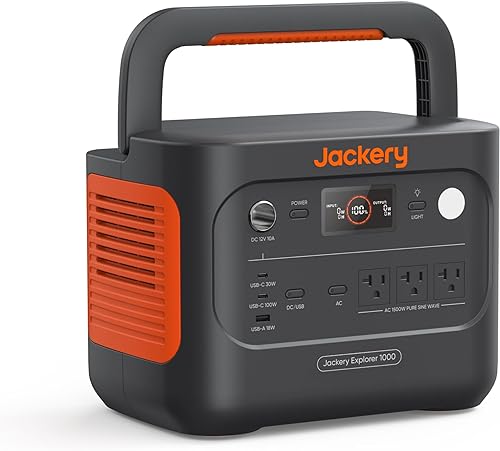
- 1,070Wh capacity
- 1,500W AC output
- 23.8 lb weight
- Three pure sine wave AC ports
Choose this lighter station for trips where you carry power between your vehicle, campsite and home. Its output suits selected appliances, but solar charging requires Jackery panels bought separately.
Pros
- Lightest option in this comparison
- Foldable carrying handle
- 100W PD USB-C output for compatible devices
- Choice of default, emergency and quiet overnight charging
Cons
- Solar panel not included
- Solar charging works only with Jackery panels
- Emergency charging requires app activation before each charge
When the Jackery Explorer 1000 v2 fits your routine
A good match is a camper powering lights, phones, a laptop and an occasional compatible appliance. You can spread those loads through the day instead of running every device at once.
It's also useful for an outage plan built around a few essentials. Decide which devices need steady power and which can wait, since even a short cooking task can take energy away from longer-running loads.
Who should skip it?
Skip this model if you need to run several power-hungry appliances together or expect electric heat for many hours. Those jobs demand more output, more stored energy, or both.
Also look elsewhere if reusing another brand's solar panels is central to your plan. A station that fits your existing charging equipment can be a better buy than one chosen mainly for its carrying weight.
What do its capacity and output mean for daily use?
The Jackery stores 1,070Wh of energy and supplies 1,500W of rated AC output, with a 3,000W surge peak. Capacity determines your energy budget; output determines which combination of appliances can operate.
Add the running watts of everything you want connected at once. Then check startup requirements for motors and compressors, because a refrigerator can need more power when it starts than while it runs.
Surge power is brief headroom, not a higher continuous limit. Don't plan to run an appliance above the rated output simply because its draw falls below the surge figure.
Build a runtime estimate before buying
Divide capacity in watt-hours by the load in watts to get an ideal runtime ceiling. For example, a hypothetical steady 100W load gives 1,070 ÷ 100 = 10.7 hours before accounting for losses and the station's own power use.
Your practical runtime will be lower, so don't size an overnight setup right against that ceiling. A battery reserve gives you room for changing demand or a delayed recharge.
Cycling appliances need a different approach. A refrigerator's running watts alone won't tell you its daily energy use because its compressor switches on and off.
Use measured energy consumption where possible, then work through how long a portable power station lasts. If the energy budget still feels tight, start with what size portable power station you need before choosing a model.
How easy is it to carry and pack?
At 23.8 lb, the Jackery is the lightest station in this comparison, and its foldable handle helps with short carries. It suits moving from a car to a nearby campsite better than carrying power far down a trail.
The unit measures 12.87 x 8.82 x 9.72 in. Measure your storage space with enough room for plugged-in cables and the ventilation clearance required by the manual.
Think through the lift as well as the footprint. Moving a station from floor level into a vehicle can be harder than carrying it across a room, especially with other gear in the way.
Secure it during travel so it cannot slide into luggage or block access to emergency supplies. At camp, place it on a stable, dry surface away from foot traffic and loose fabric.
If your main need is charging small devices, compare smaller options in our camping power station guide before committing to this size.
How should you charge it before a trip or outage?
Use the default charging mode for planned recharges and save emergency charging for a short window before you need power. Jackery says a full charge takes 1.7 hours by default or one hour in emergency mode.
The faster mode must be enabled in the Jackery app before each charge. Install and set up the app ahead of your trip, rather than waiting until you're packing or facing an approaching outage.
Jackery also offers a quiet overnight charging mode rated at 30dB and an energy efficiency mode. That sound figure applies to the named charging mode, so don't assume the same noise level under every operating condition.
Plan solar around the whole setup
Solar charging requires a separately bought Jackery panel. Include the panel's packed size, carrying space and setup time in your travel plan, not just the station's footprint.
Panel wattage is not a promise of steady charging power. Shade, cloud cover, panel angle and daylight hours affect how much energy you can replace during a day.
Keep the station protected while placing panels where they receive useful sun. Our guide to charging a portable power station explains how to plan around different charging sources.
Which ports should you use for your devices?
Use USB-C directly for compatible electronics and reserve AC outlets for devices that need them. This avoids an unnecessary AC adapter step and leaves those outlets available for appliances.
The Jackery has 3 pure sine wave AC outlets, 2 USB-C ports, 1 USB-A port and a DC car port. Its USB-C output includes up to 100W PD charging for compatible devices.
Check the cable as well as the device. A laptop needs suitable USB-C charging support and a cable rated for the power it requires; the connector shape alone doesn't establish compatibility.
Multiple ports don't increase the station's total power or energy budget. Keep track of everything connected, including devices charging quietly in the background.
Before depending on it overnight, confirm that the selected settings keep your intended low-power devices supplied. Read the manual's guidance on energy-saving behavior rather than assuming every mode suits every load.
When are the EcoFlow and Bluetti alternatives better?
Choose either alternative when more appliance output matters more than minimum weight. Both offer 1,800W rated AC output and 1,024Wh capacity, so their extra output doesn't mean a larger energy reserve.
EcoFlow Delta 3 Classic: Best for desk backup

- 1,024Wh capacity
- 1,800W AC output
- 26.7 lb weight
- Under 10ms UPS switchover
A better fit for a desk backup setup where transfer time and extra AC output matter more than carrying weight. Check equipment requirements and note its extra-battery restrictions before choosing it.
Pros
- More rated AC output than the Jackery
- EcoFlow rates UPS switchover at under 10ms
- EcoFlow says AC charging reaches 80% in 45 minutes
- App supports charging schedules and backup modes
Cons
- Heaviest option in this comparison
- Not compatible with DELTA 2 Smart Extra Battery or Delta 3 Series Smart Extra Battery
EcoFlow Delta 3 Classic: for a desk backup setup
The EcoFlow suits a buyer who wants backup for compatible desk equipment and values its transfer specification. EcoFlow rates UPS switchover at under 10ms, and its app supports charging schedules and backup modes.
At 26.7 lb, it's the heaviest option here. EcoFlow says AC charging reaches 80% in 45 minutes, but that is a partial-charge figure and should not be compared directly with Jackery's full-charge time.
Skip it if your plan depends on a DELTA 2 Smart Extra Battery or Delta 3 Series Smart Extra Battery. This model is incompatible with both, so don't buy it assuming matching brand names mean matching expansion gear.
For equipment that cannot tolerate an interruption, confirm the required transfer behavior with its manufacturer. A UPS time alone doesn't establish suitability for every device.
Bluetti Elite 100 V2: Best for overnight essentials

- 1,024Wh capacity
- 1,800W rated AC output
- 25 lb weight
- Bluetti rates silent mode at 30dB
Consider this station for overnight essentials when a dedicated silent mode and higher appliance output matter. It weighs slightly more than the Jackery and must stay upright during storage and transport.
Pros
- More rated AC output than the Jackery
- Bluetti rates silent mode at 30dB
- Bluetti rates UPS switchover at 10ms
- Supports compatible third-party solar panels
Cons
- Slightly heavier than the Jackery
- Must stay upright during storage and transport
- Faster vehicle charging requires BLUETTI Charger 1
Bluetti Elite 100 V2: for overnight essentials
The Bluetti suits buyers who want higher appliance output with a dedicated silent mode. Bluetti rates that mode at 30dB and its UPS transfer at 10ms, making it worth considering for compatible overnight and desk loads.
It weighs 25 lb and must remain upright during storage and transport. Skip it if your planned storage space only works with the station on its side.
It also offers a route for buyers with third-party solar panels, provided their total open-circuit voltage is within 12–60V, total power is no more than 1,000W, and the connector is compatible. Check those electrical limits before connecting panels.
For road trips, faster vehicle charging requires the separate BLUETTI Charger 1. That accessory should be part of the buying decision if charging between stops is central to your plan.
Our Jackery vs EcoFlow comparison covers broader brand choices. For help separating appliance compatibility from battery runtime, read what a 1000W portable power station can run.
What should you do when the station arrives?
Set it up around your actual essential devices before you need it away from home. This reveals unsuitable cables, awkward placement and missing charging steps while you still have time to fix them.
- Read the manual's operating, charging and storage limits.
- Inspect the station and cables for damage before charging.
- Set up the app and learn how to select the charging modes.
- Charge the battery, then connect your planned devices one at a time.
- Watch the displayed load and battery use with your normal combination connected.
- Store the needed cables together and label any that have a specific job.
For refrigerator backup, check startup demand and leave the appliance's ventilation space clear. Our guide to running a refrigerator from a portable power station explains how to build a useful runtime plan.
Connect appliances directly within the station's limits. Never feed power into a household wall outlet; supplying home circuits requires suitable transfer equipment and a qualified electrician.
How do you care for the battery and avoid common mistakes?
Protect the station from excess heat, moisture and blocked airflow, and follow Jackery's storage instructions. Battery care includes how you store it between trips, not just how you charge it.
Jackery says its LFP battery retains over 70% of its original capacity after 4,000 charge cycles. That is a capacity-retention claim, not a promise that every unit will deliver identical service for a fixed number of years.
Don't leave the station forgotten in a hot vehicle or stored empty for a long period. Follow the manual's storage charge guidance and check it before the next trip or storm season.
Our LiFePO4 vs lithium-ion guide explains the battery chemistry differences. For placement and electrical precautions, see portable power station safety.
The most costly buying mistake is confusing the ability to run an appliance with the ability to run it long enough. A high-draw cooking device may fit the output limit while quickly using energy reserved for lights and communications.
Another mistake is treating quiet mode as a promise of silence. Choose placement with fan noise and airflow in mind, especially near sleeping areas.
Finally, don't build a solar-dependent trip around ideal weather. Start with enough charge for essentials and decide what you'll stop using if the next recharge falls short.
Should you choose the Jackery Explorer 1000 v2?
Choose the Jackery Explorer 1000 v2 for frequent short carries and a planned mix of essentials. Its appeal is strongest when you can recharge between uses and its solar restrictions fit your plans.
Choose the EcoFlow for a desk backup setup where its transfer specification and app controls matter. Choose the Bluetti for overnight essentials when its silent mode, solar flexibility and upright storage requirement suit your space.
If your plan needs long periods of electric heating, several demanding appliances together or days without reliable charging, revisit the size first. Use our portable power station buying guide to match output, stored energy and recharge options before deciding.
Frequently asked questions
What can the Jackery Explorer 1000 v2 power?
The Jackery Explorer 1000 v2 can power a combination of devices within its 1,500W AC output and 3,000W surge peak. Check running and startup needs before connecting appliances, then plan runtime separately; enough output to start a device does not mean enough stored energy to run it all night.
How long does the Jackery Explorer 1000 v2 take to charge?
Jackery says a full charge takes 1.7 hours in the default mode or one hour with emergency charging enabled. You must activate emergency charging in the Jackery app before each charge.
Set up the app ahead of an outage so that step does not delay a short recharge window.
Does the Jackery Explorer 1000 v2 come with a solar panel?
No, a solar panel is sold separately; the package includes the Explorer 1000 v2 and user manual. Solar charging works only with Jackery panels.
If you already have panels from another brand, do not assume that a connector adapter will make them suitable for this station.
Is the Jackery Explorer 1000 v2 good for home backup?
Yes, it suits selected home backup loads when their power needs and required runtime fit the station. Start with essentials such as communications and a compatible refrigerator, then leave room for losses and changing demand; our home backup power station guide explains how to size that setup.


